Inside the IOP — A Deep Dive
The full story — research, decisions, modules, and everything in between.
Back to Work
The Problem
Everything was scattered. Nothing was connected.
CBRE's Design & Technology division ran its internal operations across a fragmented web of tools — spreadsheets, Power BI dashboards, manual emails, phone calls, and Teams messages. To complete a single task — say, tracking a contractor's timesheet or requesting an asset — an operations manager had to jump between multiple platforms, chase people directly, and piece together information from disconnected sources.
There was no single source of truth. No automation. No visibility across teams.
The result was predictable: delays, errors, duplicated effort, and a heavy dependency on individuals just to keep daily operations running.
"We collect info manually and track everything in Smart sheets." — Software Engineer Sr. Manager
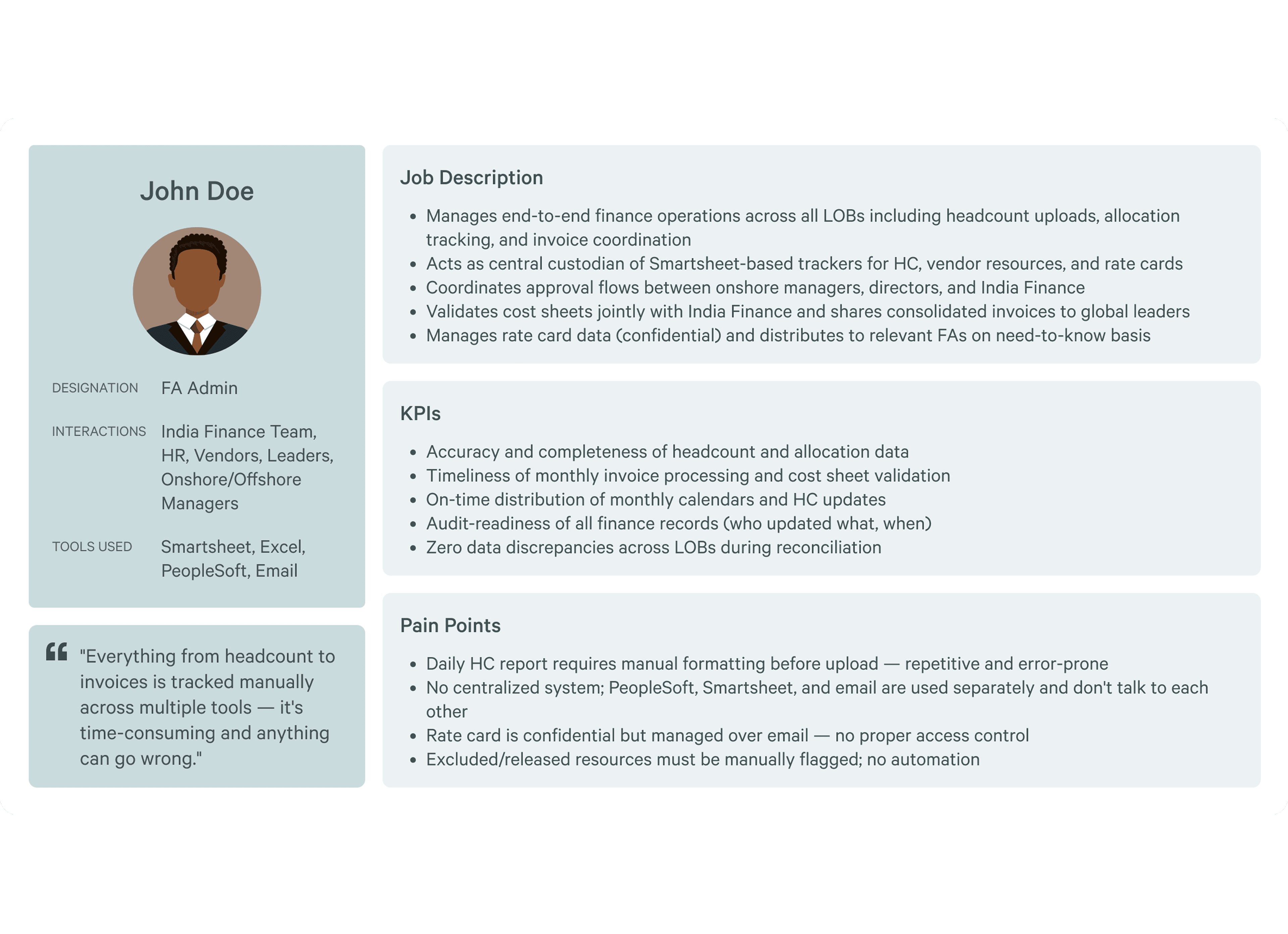
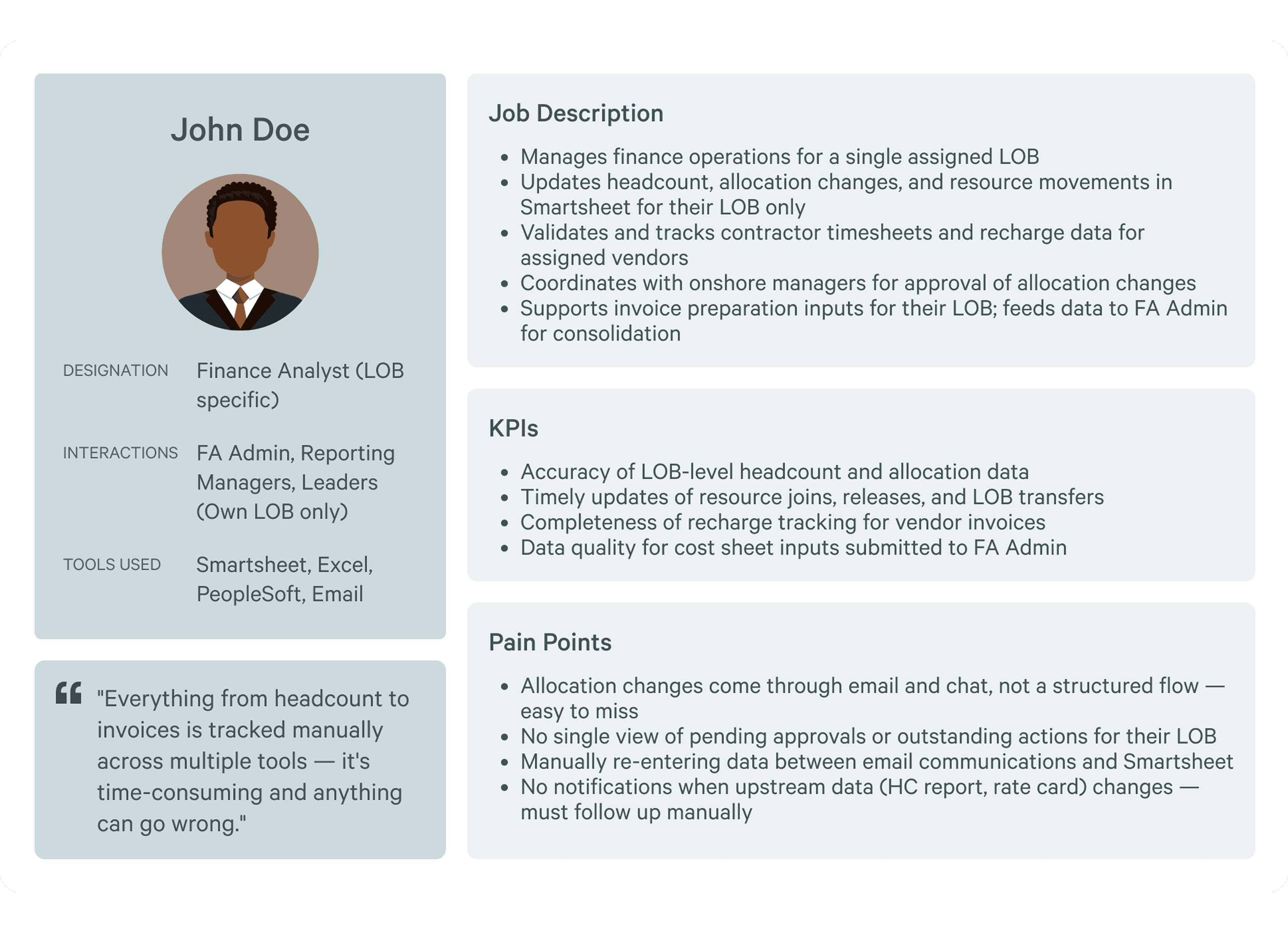
"Everything from headcount to invoices is tracked manually — it's time-consuming and anything can go wrong." — FA Admin
My Role
I was brought in as the solo designer to design the Internal Operations Portal from the ground up — a unified platform that would consolidate operations for the entire D&T division across four modules: Team Management, Asset Management, Contractor Management, and Finance.
I owned the complete design process across all four modules: research, personas, journey mapping, user flows, low-fidelity wireframes, high-fidelity prototypes, and stakeholder presentations.
Before opening Figma, I spent significant time understanding how people actually worked — not how they were supposed to work.
Research & Discovery
Research before Figma. Always.
What I did
Conducted 10+ user interviews across all user groups
Designed and distributed questionnaires to capture quantitative patterns
Built user personas for each module's primary audience
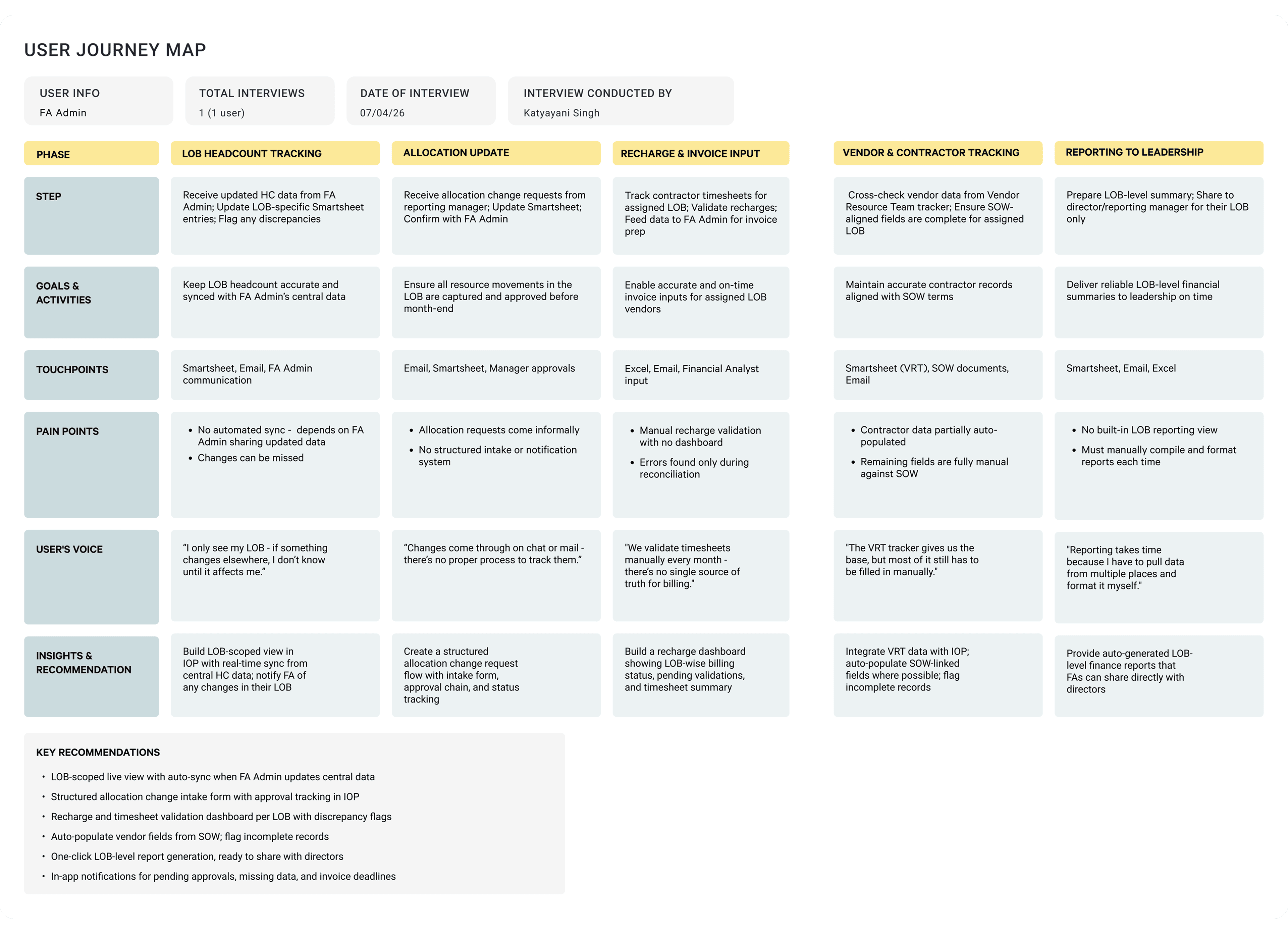
Created user journey maps per module to map pain points across every phase of a workflow
Who I designed for
Each module serves a distinct user group with very different needs, mental models, and technical comfort levels:
Team Management
D&T Leaders and Managers
Asset Management
Operations Team
Contractor Management
Vendor Resource Employees
(Contractors)
Finance
FA Admins and
Finance Analysts (LOB)
Designing one coherent system for four distinct audiences — ranging from senior leaders to on-ground operations staff to external contractors — was the central design challenge of this project.
10+ User Interviews
6 User Personas
6 Journey Maps
4 Modules Researched
What research revealed
Everything lived in too many places
Manual processes created single points of failure
Leaders lacked real-time visibility
Contractors were an afterthought in every existing system
Finance was the highest-stakes, most error-prone module
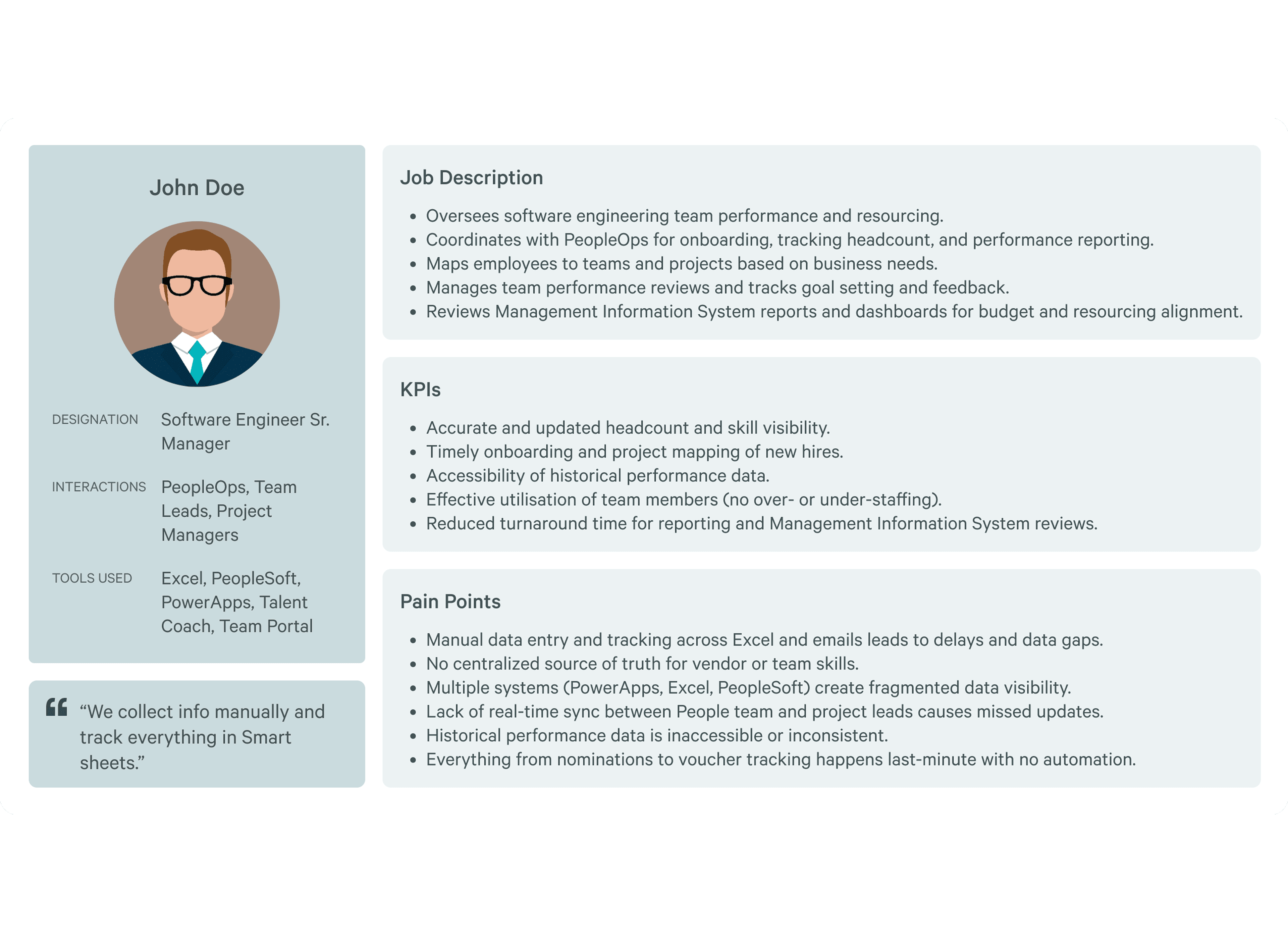
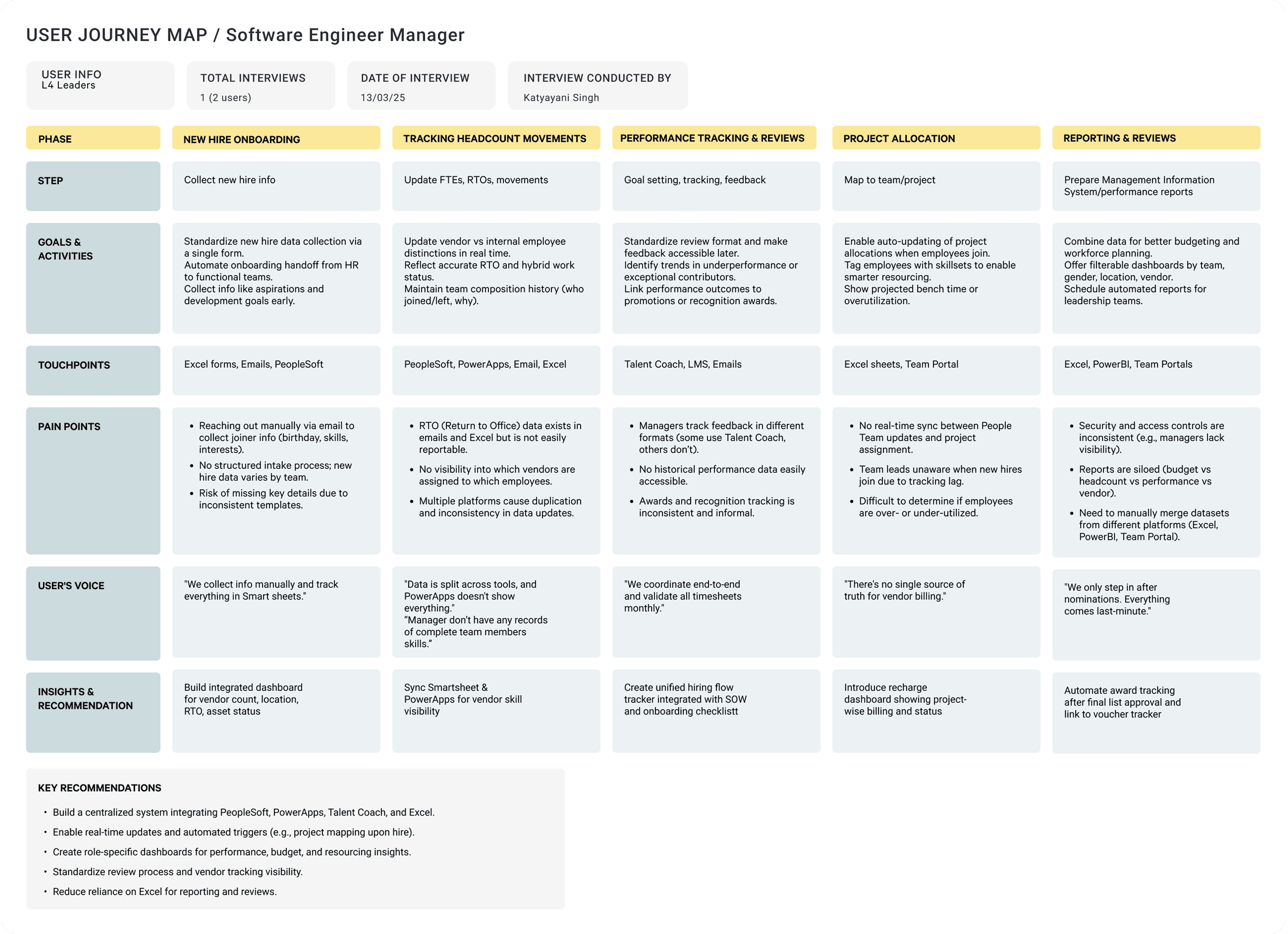
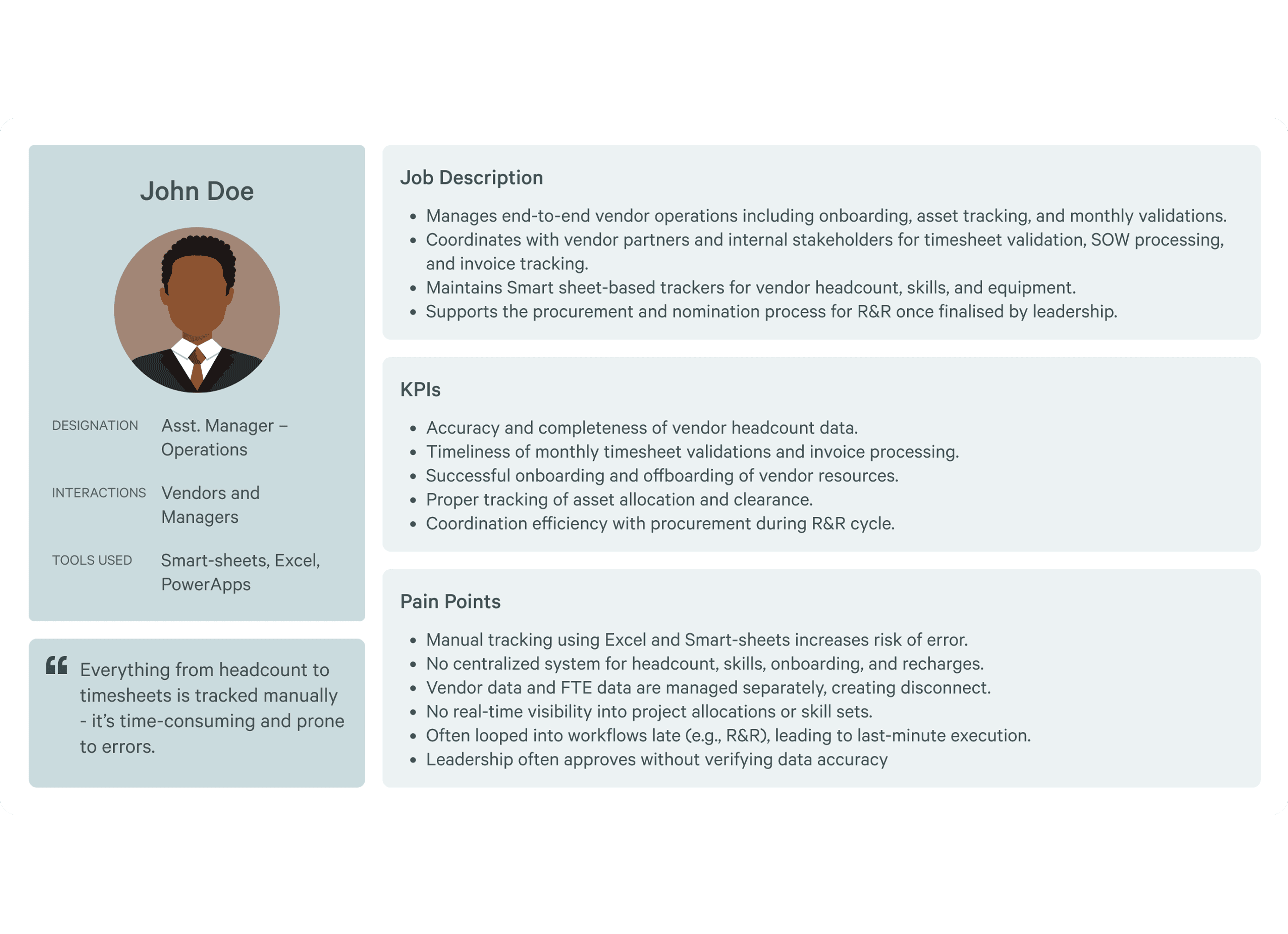
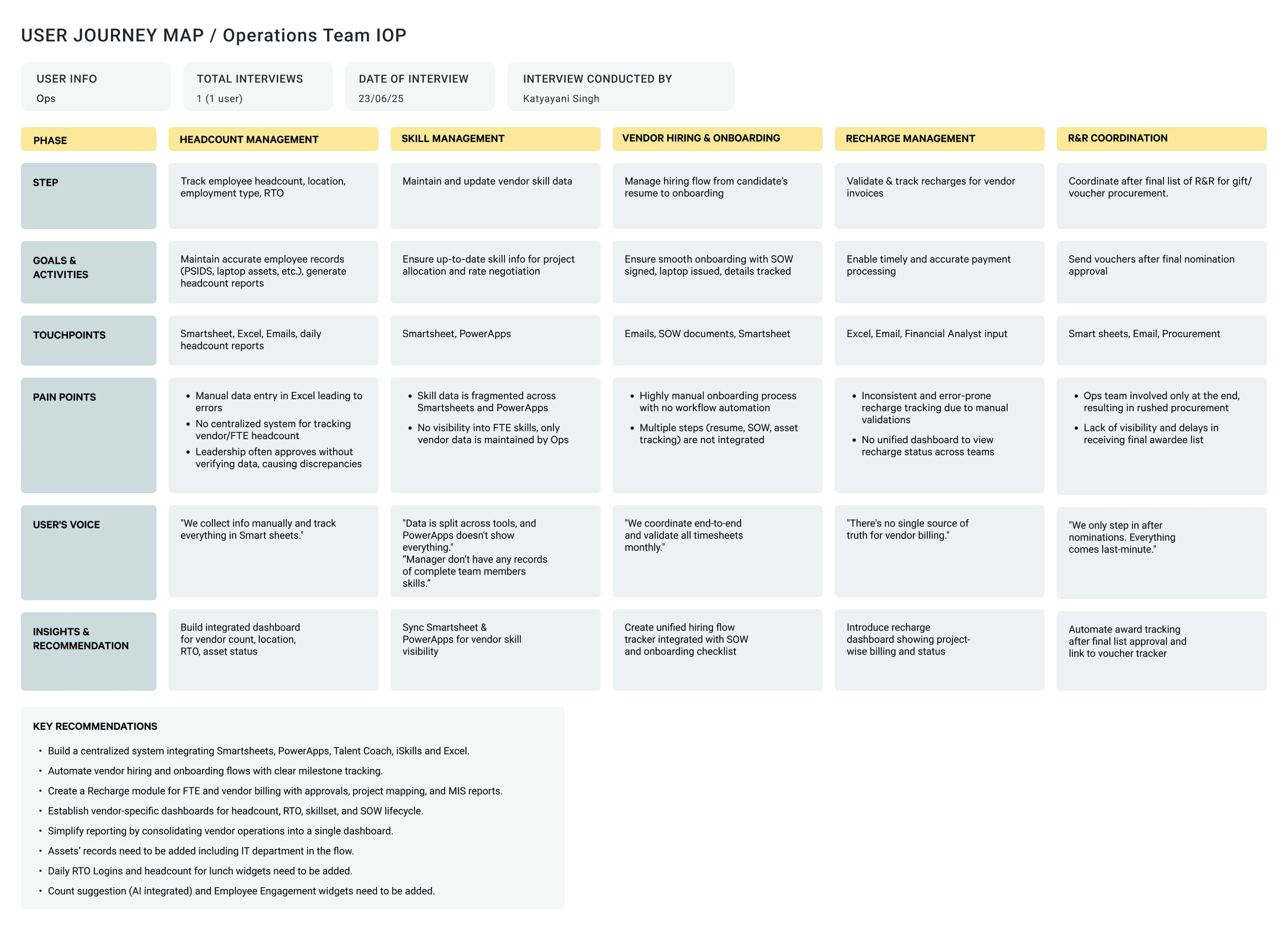
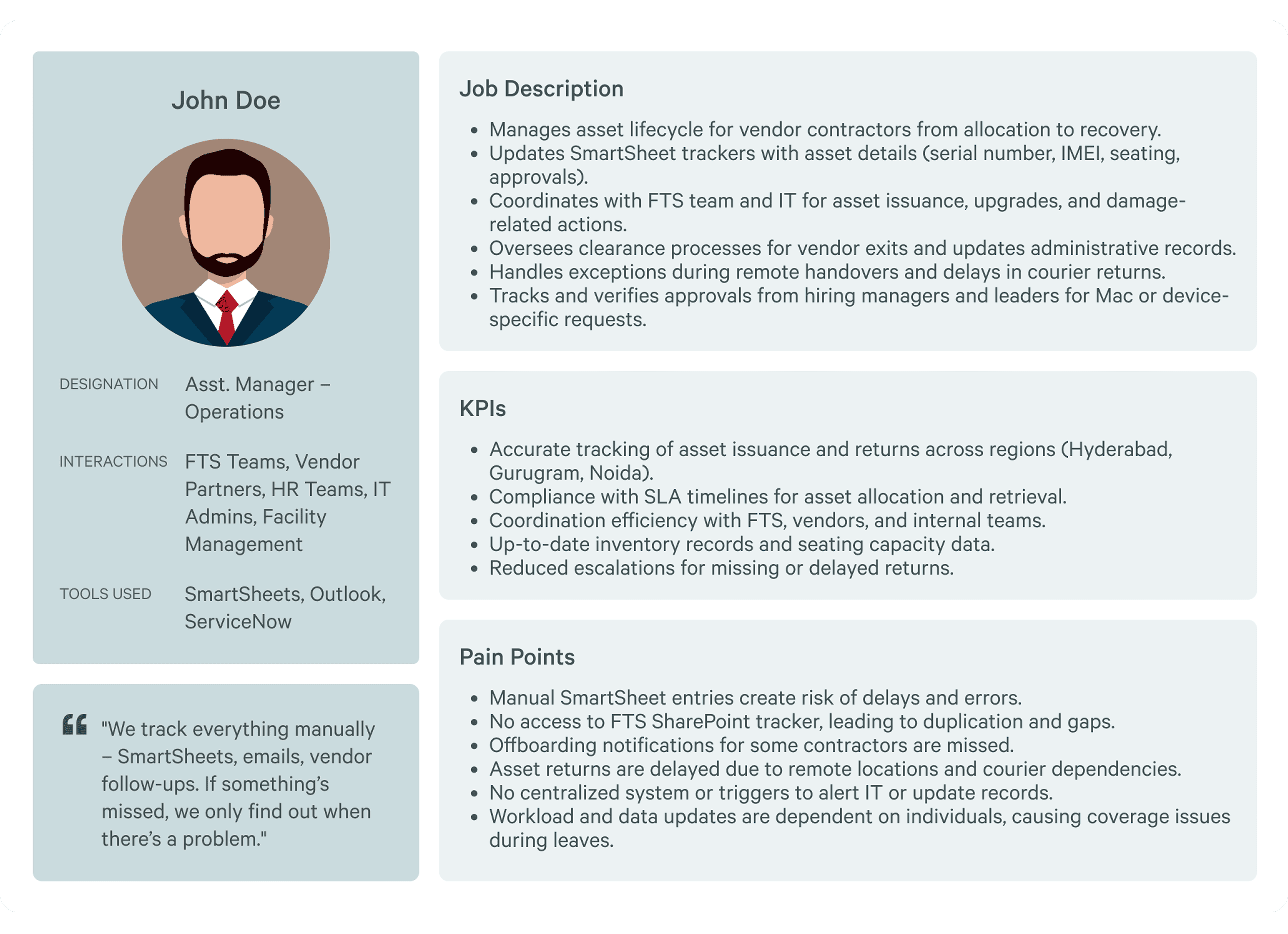
Theme 1: Everything lived in too many places
Every user group named a different combination of tools — SmartSheets, Excel, Power BI, PeopleSoft, ServiceNow, Outlook, SharePoint — none of which talked to each other. Getting a complete picture of anything required manually consolidating data from multiple sources.
Theme 2: Manual processes created a single point of failure
When processes depended on individuals knowing what to do and when, things fell through the cracks during leaves, handoffs, or high-volume periods. There were no automated triggers, no alerts, no audit trails.
Theme 3: Leaders lacked real-time visibility
Managers and leaders consistently reported that by the time data reached them — through reports, emails, or meetings — it was already outdated. Decision-making was reactive, not proactive.
Theme 4: Contractors were an afterthought in every existing system
Vendor resources had no dedicated access to track their own leaves, timesheets, or status. They depended entirely on email chains and manual follow-ups with their coordinators.
Theme 5: Finance was the highest-stakes, most error-prone module
The FA Admin's entire workflow — HC uploads, allocation changes, invoice processing, rate card management — happened across PeopleSoft, SmartSheets, Excel, and email simultaneously. One formatting error or missed approval could cause downstream financial discrepancies.
Design Approach
I was brought in as the solo designer to design the Internal Operations Portal from the ground up — a unified platform that would consolidate operations for the entire D&T division across four modules: Team Management, Asset Management, Contractor Management, and Finance.
I owned the complete design process across all four modules: research, personas, journey mapping, user flows, low-fidelity wireframes, high-fidelity prototypes, and stakeholder presentations.
Module Spotlights
Four modules. One system.
Team Management
"One view for every leader"
The challenge
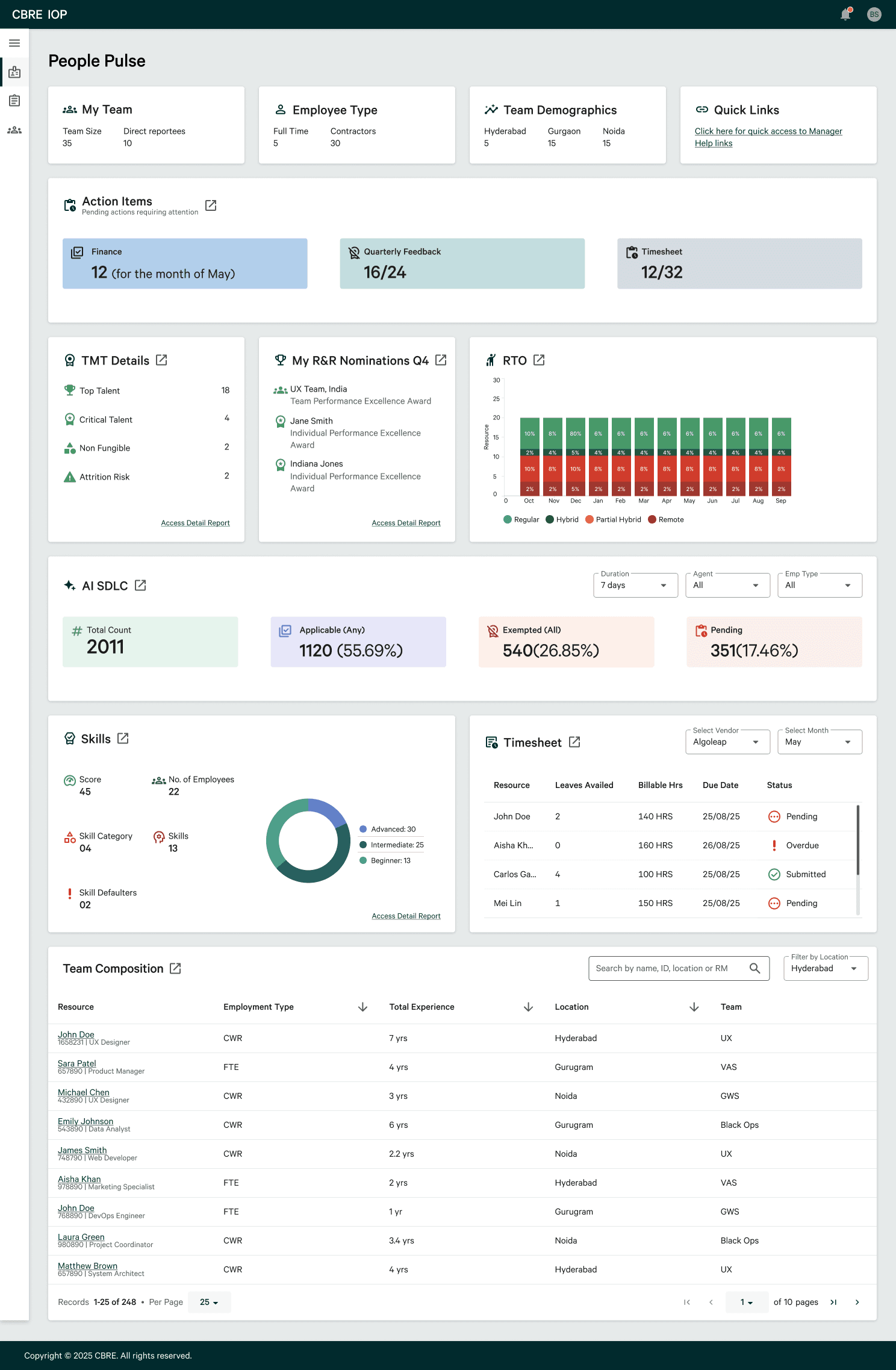
D&T Leaders and Managers had no unified view of their teams. Headcount data lived in SmartSheets. Skills data was tracked separately. Performance reviews happened in a different tool entirely. Vendor nominations and RTO tracking were done via email. Nothing connected.
Key flows designed
TMT Details: complete team member view with headcount, skills, and allocation
Team Composition: visual breakdown of team structure across locations and functions
R&R (Rewards & Recognition): nomination and recognition workflow built directly into the portal
Skills: skill mapping per team member to support project allocation decisions
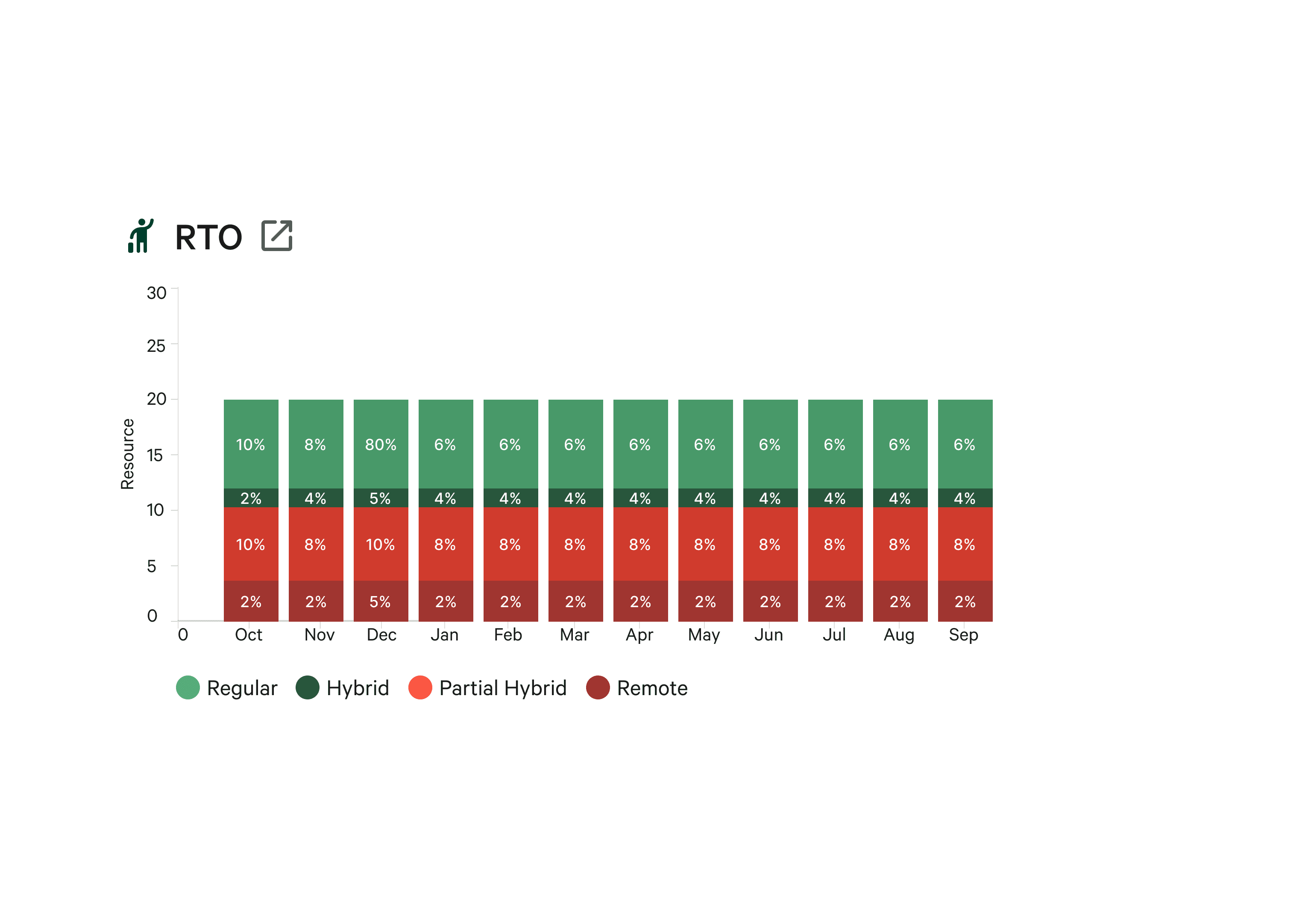
RTO Tracking: return-to-office visibility for leaders managing hybrid teams
Timesheet: team-level timesheet tracking and approval
Action Items: task management for pending approvals, reviews, and follow-ups
Design decisions worth noting
Role-based views for Leaders vs Managers Leaders and Managers use the same module but see different levels of data. Leaders have a cross-team, aggregate view — useful for headcount planning and resource allocation decisions. Managers see their direct teams in more operational detail — useful for day-to-day tracking and approvals. This wasn't the original brief, but research made it clear that a one-size view would either overwhelm leaders with granular data or under provide managers with what they needed to act.
AI SDLC - the most distinctive feature Embedded within Team Management is an AI-powered Software Development Lifecycle tracker. Rather than tracking project progress in a separate tool, the IOP surfaces AI-generated insights on project health, sprint velocity, and delivery status directly within the team management view. This gives leaders a real-time signal on how their teams are performing against project goals — without needing to pull a separate report. This was a forward-looking decision made early in the design process to future-proof the portal as CBRE's D&T function grows.
Asset Management
"From reactive to proactive"
The challenge
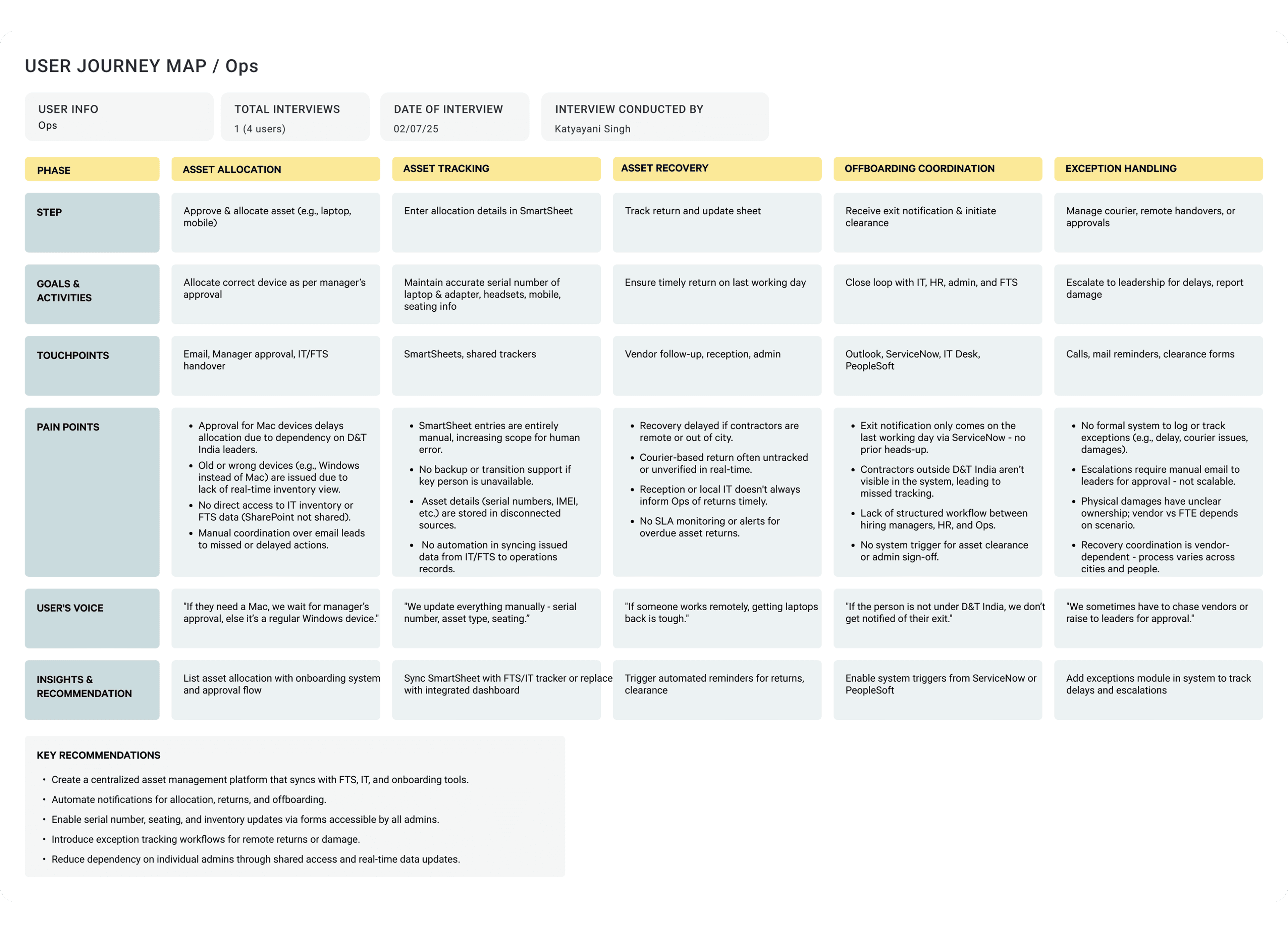
The Operations team managed thousands of assets — laptops, accessories, peripherals — across multiple office locations. Asset allocation, tracking, return, and damage reporting happened across SmartSheets, physical registers, and manual coordination between HR, IT, and vendors. There was no centralised view of what was allocated, where it was, or what condition it was in.
"If the person is out under D&T India, we don't get notified of their exit."
- Operations team, during research
This meant assets were going untracked at off-boarding — a costly and recurring problem.
Key flows designed
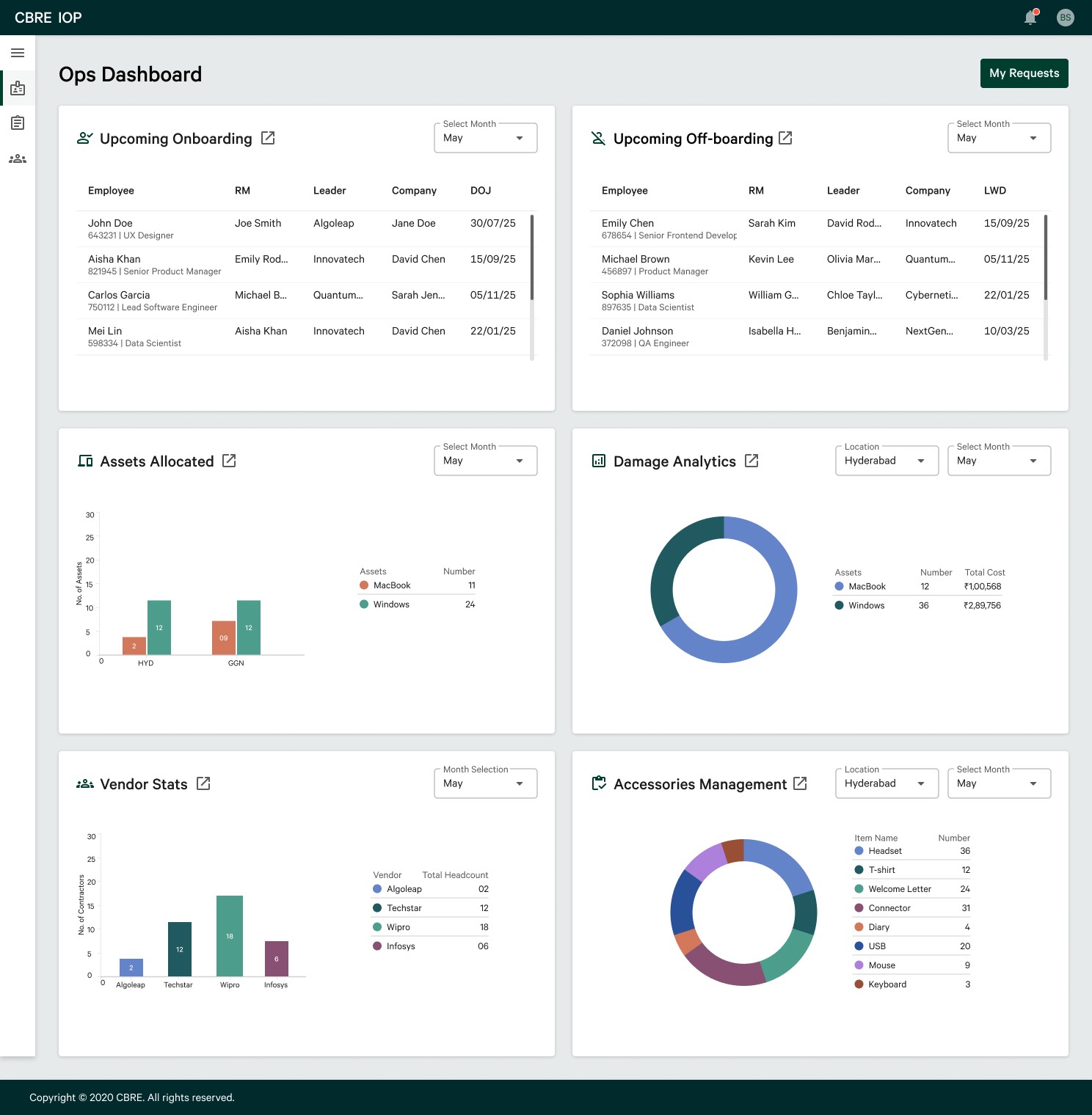
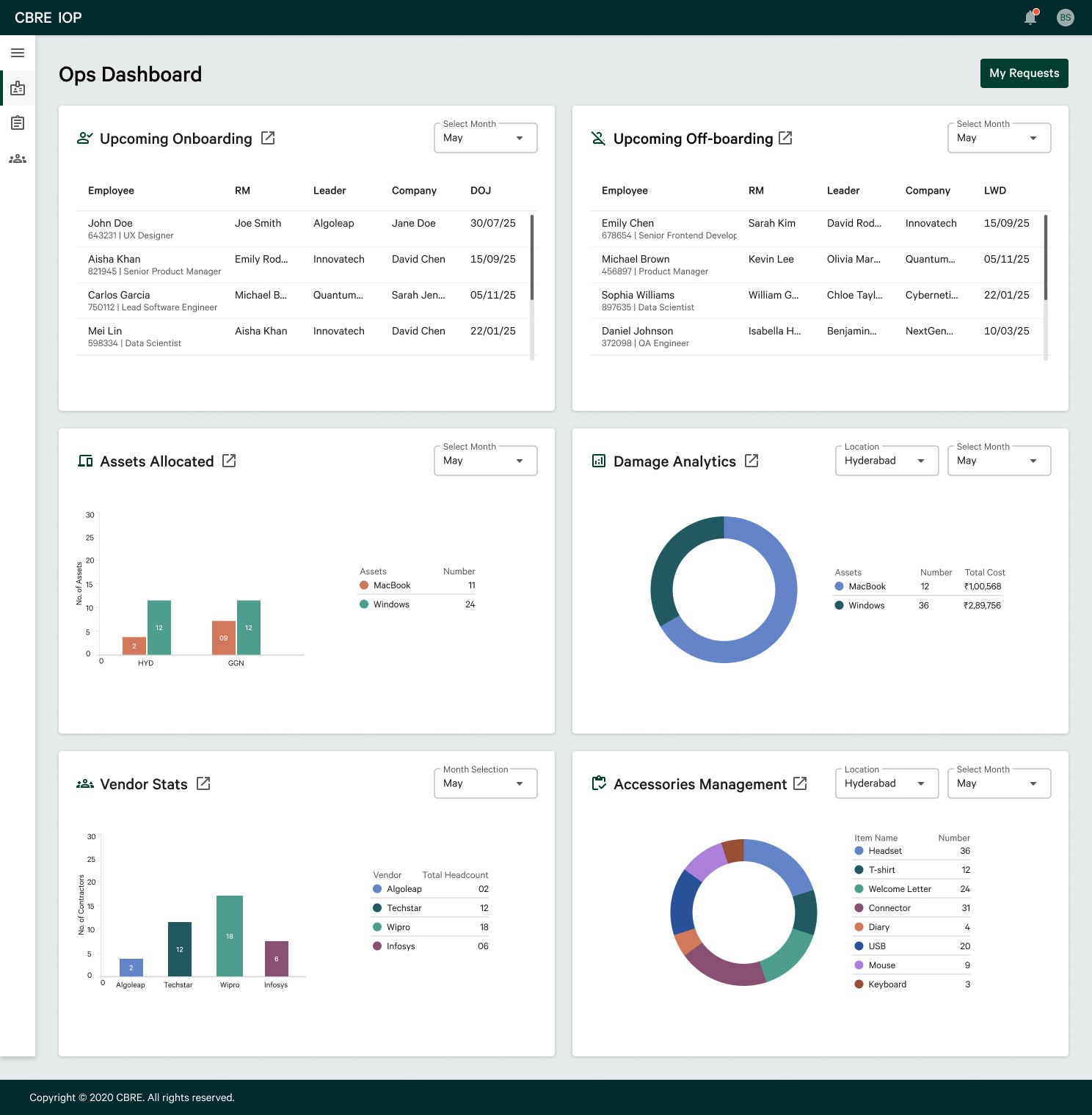
Ops Dashboard: central hub with real-time asset status, upcoming on-boarding and off-boarding, and damage analytics
Assets Allocated: complete inventory view with allocation status per employee
Upcoming On-boarding: pre-populated asset request flows triggered by joining dates
Upcoming Off-boarding: automated asset recovery checklist linked to exit timelines
Damage Analytics: damage reporting, condition tracking, and recovery workflow
Accessories Management: separate tracking for peripherals and accessories
Vendor List & Vendor Profile: vendor management directly within the portal
My Requests: employee-facing view to track their own asset requests and status
Monthly Check View: periodic audit view for ops team compliance
Design decisions worth noting
Role-based views for Leaders vs Managers Leaders and Managers use the same module but see different levels of data. Leaders have a cross-team, aggregate view — useful for headcount planning and resource allocation decisions. Managers see their direct teams in more operational detail — useful for day-to-day tracking and approvals. This wasn't the original brief, but research made it clear that a one-size view would either overwhelm leaders with granular data or under provide managers with what they needed to act.
AI SDLC - the most distinctive feature Embedded within Team Management is an AI-powered Software Development Lifecycle tracker. Rather than tracking project progress in a separate tool, the IOP surfaces AI-generated insights on project health, sprint velocity, and delivery status directly within the team management view. This gives leaders a real-time signal on how their teams are performing against project goals — without needing to pull a separate report. This was a forward-looking decision made early in the design process to future-proof the portal as CBRE's D&T function grows.
Contractor Management
"Designing for dignity"
The challenge
Vendor resource employees — contractors — had no dedicated system. Their leave applications went via email. Their timesheets were tracked in SmartSheets by their coordinators. Their status, renewals, and documentation existed in files that only their managers could access. They were completely dependent on their coordinators for basic information about their own employment.
Key flows designed
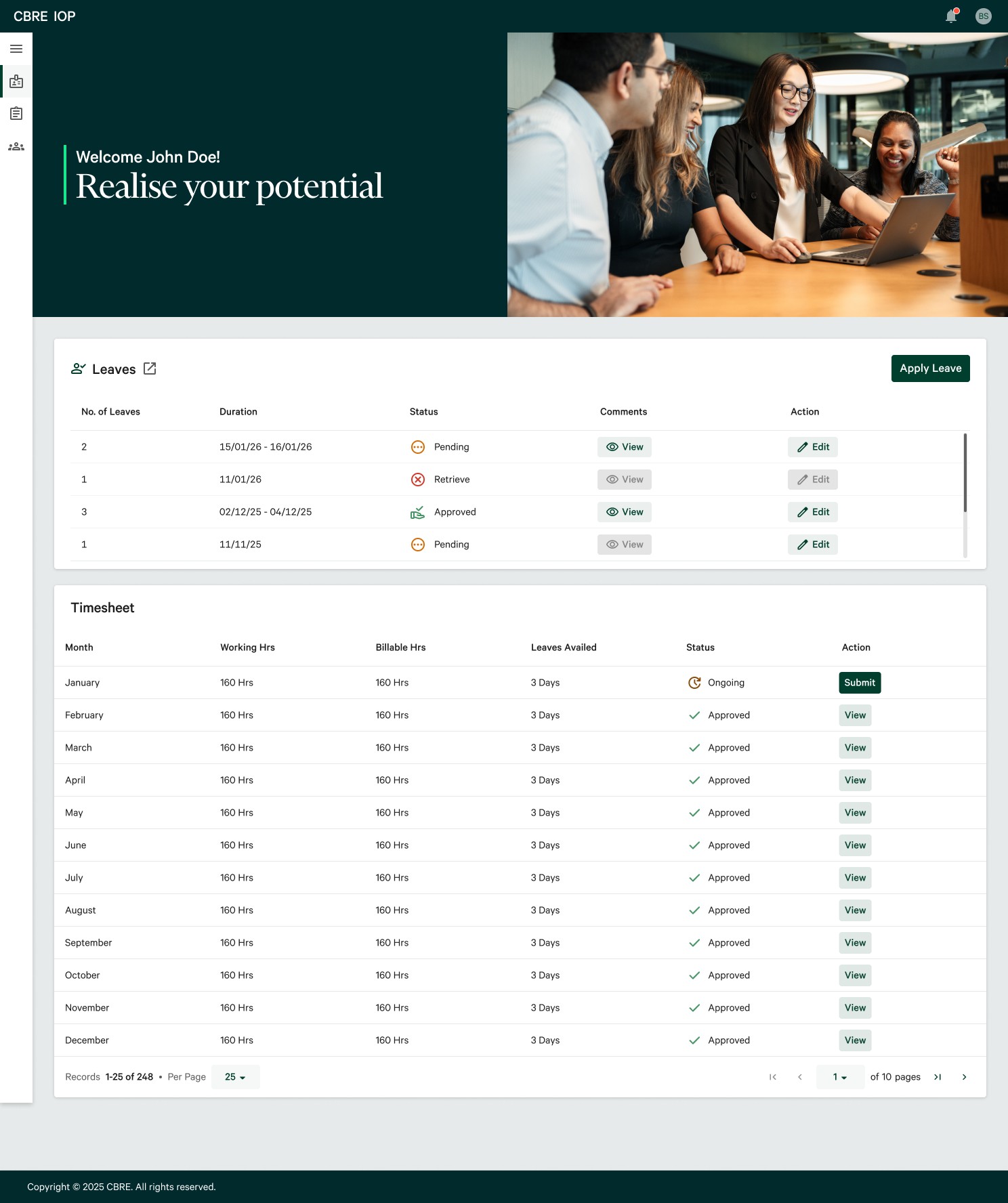
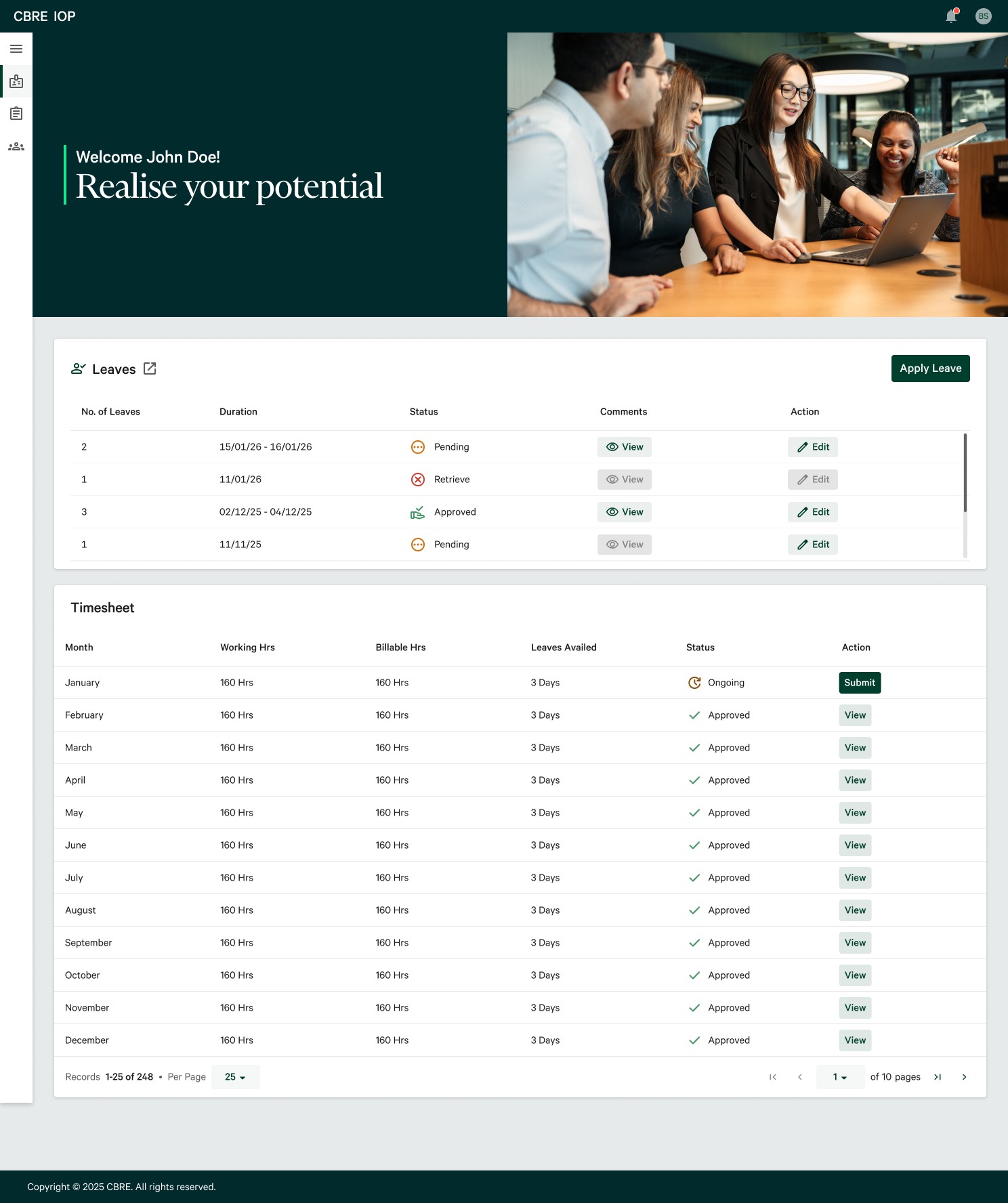
Contractor Dashboard: personalised landing page with leave overview and timesheet summary
Leave Management: apply, edit, and track leave applications directly in the portal
Timesheet: monthly timesheet view with approval status per month
Automated Email Notifications: leave application confirmation and cancellation emails sent automatically
Design decisions worth noting
Designing for dignity
The contractor dashboard opens with a personalised welcome — "Realise your potential" — and the contractor's name. This was a deliberate choice. Contractors in most enterprise systems are treated as data entries, not people. Giving them a personal, welcoming entry point was a small but meaningful signal that this portal was designed for them, not just about them.
End-to-end thinking beyond the screen
The automated email templates for leave confirmation and cancellation were designed as part of the UX — not as an engineering afterthought. A contractor applying for leave and receiving no confirmation creates anxiety and follow-up calls. Designing the notification flow alongside the application flow ensured the experience felt complete and trustworthy.
Finance (WIP)
"When one mistake costs everything"
The challenge
This was the most complex and highest-stakes module. The FA Admin's workflow involved managing headcount uploads, allocation changes, invoice processing, rate card management, and audit history — simultaneously, across PeopleSoft, SmartSheets, Excel, and email. A single formatting error or missed approval could cause downstream financial discrepancies that were difficult and time-consuming to unwind.
"We always first send the doc, wait for the Finance to fill that doc and send it back to us — then we do everything manually."
- FA Admin
"Rate card data is confidential — it's restricted entry, only custodians should access it."
- FA Admin, on access control requirements
Confidentiality, access control, and audit traceability were non-negotiable constraints — not nice-to-haves.
Key flows designed
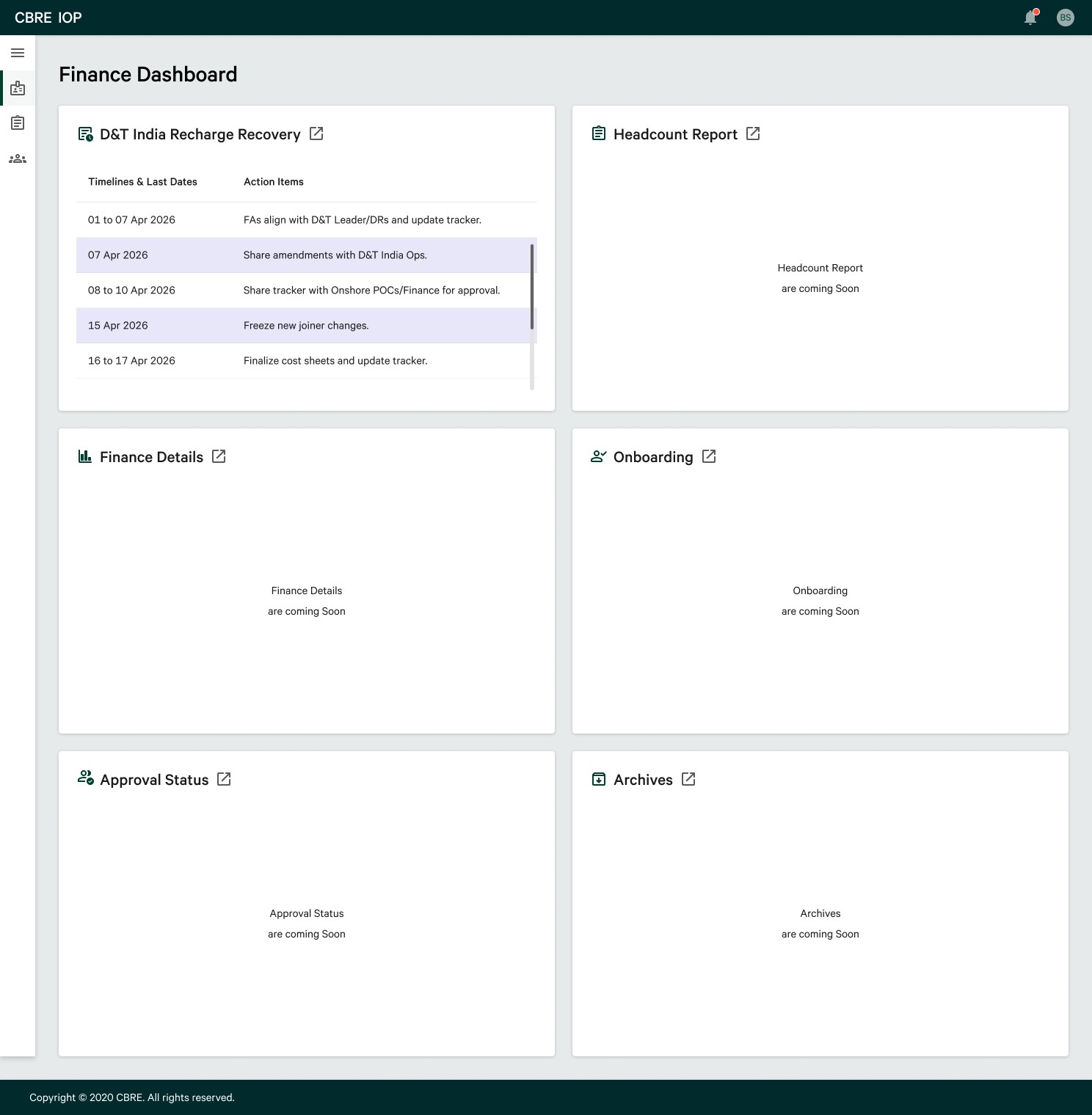
Finance Dashboard: six-widget overview covering D&T India Recharge Recovery, Headcount Report, Finance Details, Onboarding, Approval Status, and Archives
Holidays Module: holiday calendar with automated timeline reminders tied to finance deadlines
Data Calculation Logic: transparent display of how financial figures are computed, reducing disputes and reconciliation time
Automated Confirm Email: triggered on key finance actions to create an audit trail
Design decisions worth noting
Designing for confidentiality without sacrificing usability
Finance data is sensitive. Rate card information is accessible only to specific custodians. Allocation data is visible only to relevant stakeholders. Rather than applying blanket restrictions that would frustrate legitimate users, I designed a role-based access model where each user sees exactly what they need — no more, no less. This required close collaboration with stakeholders to map access tiers before designing a single screen.
Making the invisible logic visible
One of the most recurring pain points in research was that finance admins didn't trust the numbers in existing dashboards because they couldn't see how they were calculated. A small but significant design decision was to surface the data calculation logic directly within the interface — showing users what formula drives each figure. This wasn't in the original brief. It came directly from a research insight, and it fundamentally changed how finance users would interact with the dashboard.
Designing within an established system.
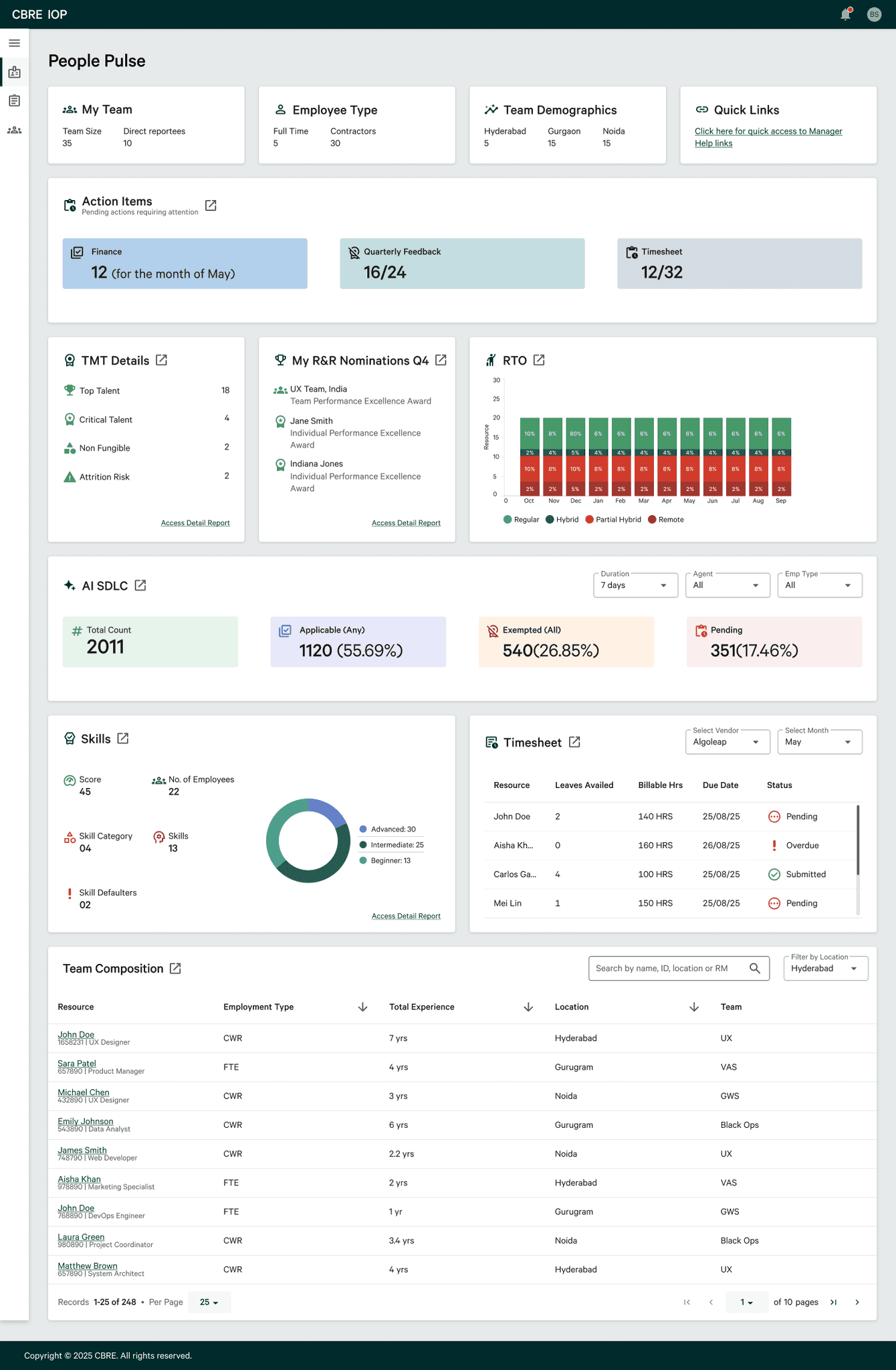
IOP was built on CBRE's existing design system — ensuring visual consistency with the broader product ecosystem from day one. Working within an established system required understanding its constraints deeply and extending it thoughtfully where new patterns were needed for complex use cases like data-heavy finance tables and multi-role dashboards.
Chatbot (Coming Soon)
A conversational AI assistant is designed to be embedded across the entire portal — giving users a natural language interface to query information, initiate workflows, and get contextual help without navigating through multiple screens. Currently in design, the chatbot is personalised to each user and capable of surfacing relevant actions based on role and context.
Current Status
Team Management → Built
Asset Management → Built
Contractor Management → Built
Finance → In Design
What this project taught me.
WHAT I'M PROUD OF
The research phase — going deep before touching Figma meant every decision had evidence behind it.
WHAT I'D DO DIFFERENTLY
Involve contractors in research earlier — they were the most underserved users and deserved more direct research time.
WHAT I LEARNED
Enterprise design is systems thinking. The hardest problems weren't visual — they were structural.